
General settings
Disable the service, then click Settings at the bottom right of the home screen’s control card. Switches save automatically and keep their state after reopening.
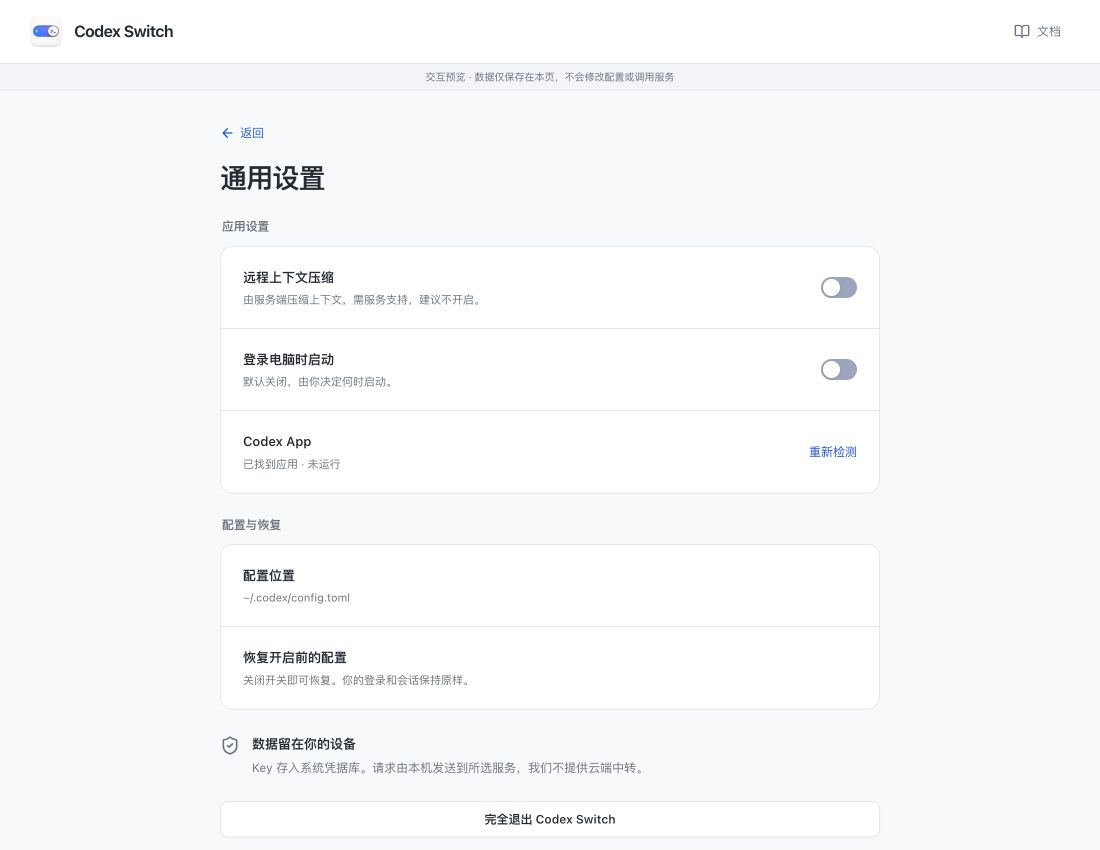
Screenshots show the Chinese app in browser preview with example data and simulated connection states. Click to enlarge.
Remote context compaction
Section titled “Remote context compaction”Off by default; keeping it off is recommended. This does not disable all compaction: Codex can still request ordinary text summaries from the model.
Enable only when your service explicitly supports remote compaction. Unsupported services may fail, with no guaranteed fallback. This applies to all selected configurations on the next activation; a running Codex may need to be reopened.
Start at login
Section titled “Start at login”Off by default. Enable it to start Codex Switch when you log in, without opening the app manually each time.
Chinese and English
Section titled “Chinese and English”Use the language button to the left of Docs. Pages, dialogs and tray menus update together, and your choice is remembered. Docs opens the guide in the matching language.
App detection and quitting
Section titled “App detection and quitting”Codex App shows installation and running status. Click Detect again after installing or moving it. Configuration location shows the file being managed.
Closing the window keeps connections running. To quit fully, first quit Codex normally, then use Quit app in the tray or the quit button in settings. To restore the original settings, simply disable the service.